

SPI 3 - Application
LCD interface
Since we already know how to drive a graphic LCD panel, in particular in text mode, let's try to write text out from the LPC.
From the FPGA point of view, the LCD controller uses a few blockrams to hold the font, characters to display, etc...
So we just have to make sure that SPI data gets into the blockrams.
From the ARM point of view, the function that sends data to the LCD blockrams is called "SSP_WriteBlock".
// function used to write in the LCD blockrams
void SSP_WriteBlock(char* ob, int len, int addr);

void LCD_PutString(char* s, int x, int y)
{
  // the blockram that holds the characters starts at address 0, and have 80 characters per line
  SSP_WriteBlock(s, strlen(s), x+y*80);
}

void main(void)
{
  SSP_init();

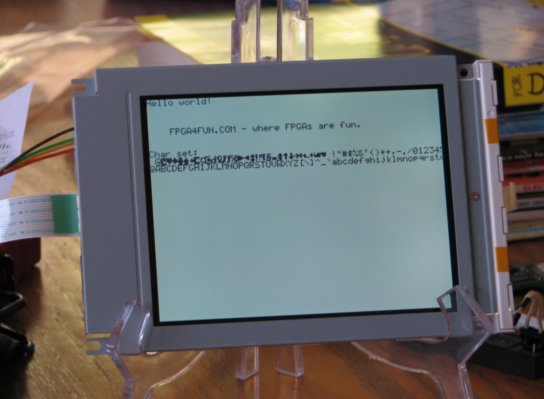
  LCD_PutString("Hello world!", 0, 0);
  LCD_PutString("FPGA4FUN.COM - where FPGAs are fun.", 4, 3);

  LCD_PutString("Char set:", 0, 7);
  int i; for(i=0; i<128; i++) LCD_PutChar(i, i, 8);

  LCD_Cursor_off();
}
After configuring the FPGA with the LCD controller, and running the ARM code, here's what we get:
More ideas of projects
- Interface to a SPI flash memory
- Create a complete console or GUI on the LCD
- Create an embedded scope using Flashy+FPGA+ARM+LCD
- ...