

Music box
Here we teach our FPGA how to play sounds and music.
We start by generating a single tone. Then slowly more fun stuff like producing a police siren and play a tune.
You can listen to the sound produced by clicking on the speaker icon. For example here's the "police siren" .
.
We start by generating a single tone. Then slowly more fun stuff like producing a police siren and play a tune.
You can listen to the sound produced by clicking on the speaker icon. For example here's the "police siren"
.The hardware
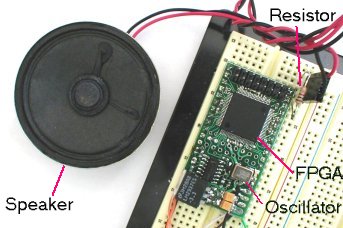
A Pluto FPGA board, a speaker and a 1KΩ resistor are used for this project.
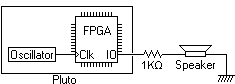
A more formal representation looks like this:
The oscillator provides a fixed frequency to the FPGA. The FPGA divides the fixed frequency to drive an IO. The IO is connected to a speaker through the 1KΩ resistor. By changing the IO frequency, the FPGA produces different sounds.
The music box project is split into four parts: