fpga4fun.com - where FPGAs are fun.
Home
Welcome
Information


FPGA projects
Music box
Pong game
R/C servos
Text LCD module
Quadrature decoder
PWM and one-bit DAC
Debouncer
LED displays
Crossing clock domains
External contributions

FPGA interface projects
RS-232
JTAG
I2C
EPP
SPI
CNC steppers

FPGA advanced projects
Graphic LCD panel
Digital oscilloscope
10BASE-T interface
PCI interface
Spoc CPU core

Hands-on
A simple oscilloscope


FPGA introduction
What are FPGAs?
How FPGAs work
FPGA pins
Clocks and global lines
Download cables
Configuration
Learn more

FPGA software
Design software
Pin assignment
Design-entry/HDL
Simulation/HDL
Synthesis and P&R

FPGA electronic
SMD technology
Crystals and oscillators

HDL info
HDL tutorials
Verilog tips
VHDL tips

Quick-start guides
ISE
Quartus

Site
News
FPGA links
HDL tutorials
Forum


LED dot-matrix displays

LED displays are also commonly available in "dot-matrix" form.
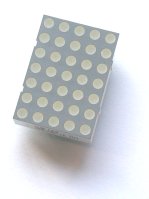
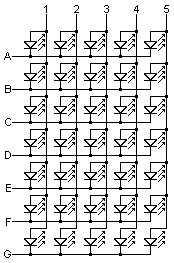
Internally, the LEDs are organized in a matrix. Here's a 5x7 display internal wiring (requires a minimum of 13 pins, likely to be shipped in a 14 pins package).

A multiplex driver is required. For example, you might want to scan the 7 rows, and send data through the 5 columns. Do that fast enough (100Hz at least) and nobody will notice the multiplexing. Remember that power transistor might be required (at least for the rows) since FPGA IOs are unlikely to provide enough current.

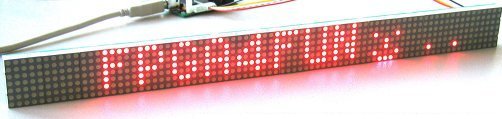
Most dot-matrix displays come in 5x7, 5x8 or 8x8 form, and can be used to form bigger displays. Here's what can be done with a little work.
Your turn to experiment!


This page was last updated on May 28 2006.