

Debouncer 2 - The solution
One solution would be to add an R/C hardware filter, and use a Schmitt-trigger gate to feed the FPGA.
But there is a simpler solution.
FPGA filter
FPGAs are great at simple arithmetic. Let's use a counter in the FPGA to see how long the push-button is pushed or released. Only once the counter is maxed-out, we decide that the push-button has changed state.
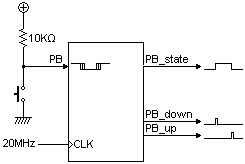
PB is the push-button signal (active low in this example). It may contain glitches, and is asynchronous to any clock. So it is mostly unusable as it is.
We are going to synchronize PB to a clock (20MHz in this example) and then create three outputs, glitch free, synchronous to the clock.
Each output will be active high and indicate a different condition of the push-button (push-button state, just pushed, just released).
module PushButton_Debouncer(
    input clk,
    input PB,  // "PB" is the glitchy, asynchronous to clk, active low push-button signal

    // from which we make three outputs, all synchronous to the clock
    output reg PB_state,  // 1 as long as the push-button is active (i.e. pushed down)
    output PB_down,  // 1 for one clock cycle when the push-button goes down (i.e. just pushed)
    output PB_up   // 1 for one clock cycle when the push-button goes up (i.e. just released)
);

// First use two flip-flops to synchronize the PB signal the "clk" clock domain
reg PB_sync_0;  always @(posedge clk) PB_sync_0 <= ~PB;  // invert PB to make PB_sync_0 active high
reg PB_sync_1;  always @(posedge clk) PB_sync_1 <= PB_sync_0;

// Next declare a 16-bit counter
reg [15:0] PB_cnt;

// When the push-button is pushed or released, we increment the counter
// The counter has to be maxed out before we decide that the push-button state has changed

wire PB_idle = (PB_state==PB_sync_1);
wire PB_cnt_max = &PB_cnt;	// true when all bits of PB_cnt are 1's

always @(posedge clk)
if(PB_idle)
    PB_cnt <= 0;  // nothing's going on
else
begin
    PB_cnt <= PB_cnt + 16'd1;  // something's going on, increment the counter
    if(PB_cnt_max) PB_state <= ~PB_state;  // if the counter is maxed out, PB changed!
end

assign PB_down = ~PB_idle & PB_cnt_max & ~PB_state;
assign PB_up   = ~PB_idle & PB_cnt_max &  PB_state;
endmodule
We used a 16-bit counter. With a 20MHz system clock, it would take 3ms to max-out. From the user's perspective, 3ms is instantaneous. But the glitches are gone. Depending on how glitchy your push-button is and your system clock speed, you might need to adjust the counter width.