

10BASE-T FPGA interface 3 - Sending packets
Now that we know what needs to be transmitted, let's do it.
The software from part 2 sends raw Ethernet packet data to the serial port of the PC.
Our FPGA board will just need to receive it from the serial port (slow...) and send it on the 10BASE-T wire pair (fast!).
Having the PC calculate the raw packet data allows us to experiment very easily with all the packet parameters. That's fine, but ultimately the FPGA should work in standalone mode and cook/send the packets all by himself.
But 10BASE-T requires the bits to be "Manchester encoded". That requires doubling of the number of bits!
That may work. But we are gating the clock. That's not recommended in FPGA designs. In this particular case, that would degrade the 20Mbps signal quality because each bit transition would have glitches (the data output never exactly coincide with the clock).
So let's use a 20MHz clock.
The NLP can also be replaced by a "Fast Link Pulse" (FLP) burst, during a process called "auto-negotiation". The FLP carries information about the capabilities of the sender, so that the hardware at both end of a cable can negotiate the link parameters, like the speed and the half/full duplex status.
We assume we also know the length of the packet. We are going to read the packet data and send it on the Ethernet.
First we need a start signal.
At 20MHz, we require 2 clock periods per bit. 16 clocks are required for an 8-bit byte.
When we reach the last bit of a byte, we read a new byte from the RAM and put it into a shift-register. The shift register gives us a new bit every other clock.
Each packet needs to end with a "TP_IDL" (a positive pulse of about 3 bit-times, followed by an idle period).
Finally, a Manchester encoder sends the bits, followed by the TP_IDL.
The code shown here is a little bit simplified. For example, the NLP pulses required to keep the link alive are missing. The complete code can be found here.
This code works with both hubs and switches. Since we used only NLP, the link is half-duplex and packet losses are possible when collisions occur.
Switches show very few drops - since we transmit only here, collisions never happen unless another station sends broadcast packets (could be fixed by using FLP pulses to bring the link into full-duplex).
Hubs show high numbers of packet drops, due to the high probabilities of having collisions.
Here's a simple UDP tester software that can send and/or receive UDP packets on a PC (using the PC's Ethernet network adapter).
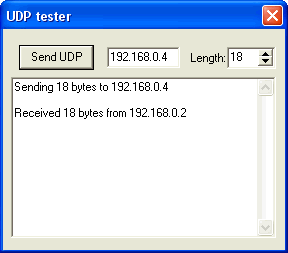
You can send packets to yourself - just use your machine own IP. But in that case packets are routed internally and never have a chance to go on the network, so that's not too useful.
To find a PC's IP or Ethernet MAC address, you can type "ipconfig /all" on the command-line.
Note that the port value 1024 is hard-coded in the software (only the destination IP and payload length are configurable in the GUI). That's not a problem in practice as it is unlikely that your machine has another application already listening to this particular port.
The software from part 2 sends raw Ethernet packet data to the serial port of the PC.
Our FPGA board will just need to receive it from the serial port (slow...) and send it on the 10BASE-T wire pair (fast!).
Having the PC calculate the raw packet data allows us to experiment very easily with all the packet parameters. That's fine, but ultimately the FPGA should work in standalone mode and cook/send the packets all by himself.
Manchester encoding
A 10BASE-T network works at 10Mbps (10 megabits per seconds).But 10BASE-T requires the bits to be "Manchester encoded". That requires doubling of the number of bits!
- A logical '0' is sent as a high bit followed by a low bit.
- A logical '1' is sent as a low bit followed by a high bit.
FPGA clock
Simplicity would dictate that we use a 10MHz clock and we generate the 20Mbps Manchester bitstream by 'xoring' the clock with the output data bits.That may work. But we are gating the clock. That's not recommended in FPGA designs. In this particular case, that would degrade the 20Mbps signal quality because each bit transition would have glitches (the data output never exactly coincide with the clock).
So let's use a 20MHz clock.
Keeping the link alive
Even if no packets are sent on a 10BASE-T cable, a pulse has to be sent periodically (called the "Normal Link Pulse" or "NLP"). It is used to keep the connection "alive". A pulse needs to be sent every 16ms or so.The NLP can also be replaced by a "Fast Link Pulse" (FLP) burst, during a process called "auto-negotiation". The FLP carries information about the capabilities of the sender, so that the hardware at both end of a cable can negotiate the link parameters, like the speed and the half/full duplex status.
HDL design
Let's assume the packet to be sent is available in a RAM in the FPGA.|
ram512 ram( .data(ram_input), .wraddress(wraddress), .clock(clk), .q(ram_output), .rdaddress(rdaddress) ); |
We assume we also know the length of the packet. We are going to read the packet data and send it on the Ethernet.
First we need a start signal.
|
wire StartSending; // pulse indicating when to start sending the packet reg SendingPacket; always @(posedge clk) if(StartSending) SendingPacket<=1; else if(DoneSending) SendingPacket<=0; |
At 20MHz, we require 2 clock periods per bit. 16 clocks are required for an 8-bit byte.
|
reg [3:0] ShiftCount; // count from 0 to 15, as 16 clocks are required per 8-bit bytes always @(posedge clk) if(SendingPacket) ShiftCount <= ShiftCount+1; else ShiftCount <= 0; |
When we reach the last bit of a byte, we read a new byte from the RAM and put it into a shift-register. The shift register gives us a new bit every other clock.
|
wire readram = (ShiftCount==15); // time to read a new byte from the RAM? reg [7:0] ShiftData; always @(posedge clk) if(ShiftCount[0]) ShiftData <= readram ? ram_output : {1'b0, ShiftData[7:1]}; always @(posedge clk) if(readram) rdaddress <= SendingPacket ? rdaddress+1 : 0; |
Each packet needs to end with a "TP_IDL" (a positive pulse of about 3 bit-times, followed by an idle period).
|
reg [2:0] idlecount; // enough bits to count 3 bit-times always @(posedge clk) if(SendingPacket) idlecount<=0; else if(~&idlecount) idlecount<=idlecount+1; |
Finally, a Manchester encoder sends the bits, followed by the TP_IDL.
|
reg qo; always @(posedge clk) qo <= SendingPacket ? ~ShiftData[0]^ShiftCount[0] : 1; reg qoe; always @(posedge clk) qoe <= SendingPacket | (idlecount<6); reg q1; always @(posedge clk) q1 <= (qoe ? qo : 1'b0); reg q2; always @(posedge clk) q2 <= (qoe ? ~qo : 1'b0); |
The code shown here is a little bit simplified. For example, the NLP pulses required to keep the link alive are missing. The complete code can be found here.
This code works with both hubs and switches. Since we used only NLP, the link is half-duplex and packet losses are possible when collisions occur.
Switches show very few drops - since we transmit only here, collisions never happen unless another station sends broadcast packets (could be fixed by using FLP pulses to bring the link into full-duplex).
Hubs show high numbers of packet drops, due to the high probabilities of having collisions.
Incoming packets
The FPGA sends UDP packets. But how do you detect them?Here's a simple UDP tester software that can send and/or receive UDP packets on a PC (using the PC's Ethernet network adapter).
- The software listens to port 1024. If it receives a packet on this port, it displays how many bytes it got.
- The software can also send on port 1024. Just press the "Send UDP" button.
You can send packets to yourself - just use your machine own IP. But in that case packets are routed internally and never have a chance to go on the network, so that's not too useful.
To find a PC's IP or Ethernet MAC address, you can type "ipconfig /all" on the command-line.
Note that the port value 1024 is hard-coded in the software (only the destination IP and payload length are configurable in the GUI). That's not a problem in practice as it is unlikely that your machine has another application already listening to this particular port.